R36S WiFi Adapter Kit - Best Type-C OTG Setup
R36S WiFi Adapter Overview
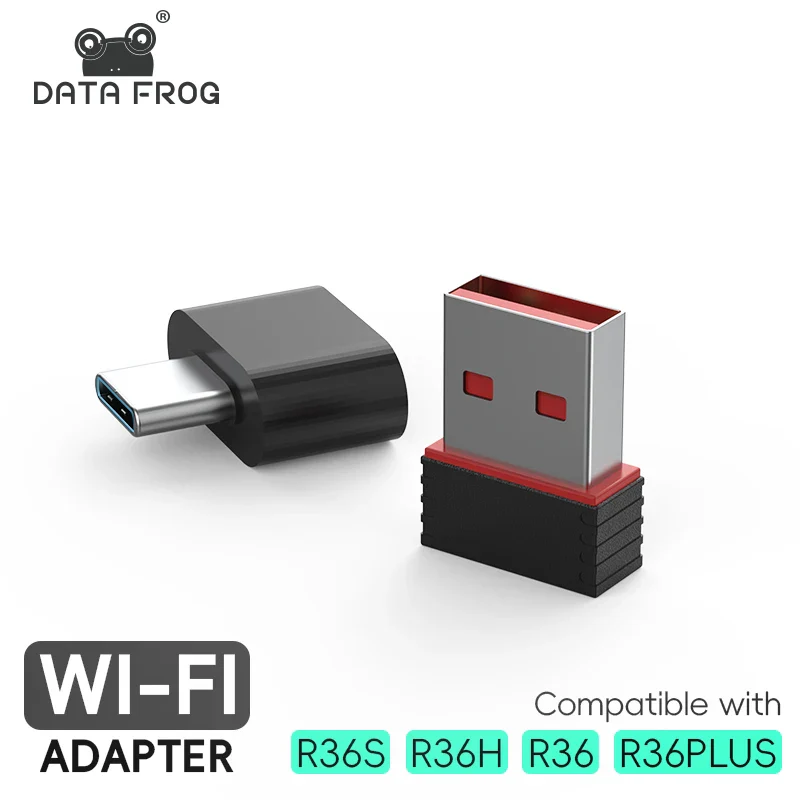
The R36S WiFi adapter kit is a compact USB wireless accessory for compatible R36 series handheld setups. It is made for users who want a simple Type-C OTG connection path for network features supported by their firmware and device configuration.
This kit is best understood as an accessory for compatible handheld software setups. Support can depend on the exact model, firmware build, USB OTG behaviour, system settings, and adapter chipset recognition.
We avoid unsupported authority claims. Before ordering, check your device model and firmware notes. If your handheld does not support USB wireless adapters through its current software, the adapter may not add WiFi by itself.
Why Choose This R36S WiFi Adapter Kit
The kit includes a USB WiFi dongle and a Type-C OTG connection path. That makes it easier to test network features on compatible R36S, R36H, R36, or R36 Plus style handheld setups without buying separate parts first.
The small size makes it easy to keep with a travel pouch, desk setup, or accessory box. It is most useful for users who already understand their handheld menu, firmware, and connection settings.
If you are new to retro handhelds, start with basic device setup first. Confirm boot, storage, controls, and charging before testing network features.
Best For
- R36S users who want to test compatible WiFi features.
- Owners using firmware builds that support USB wireless adapters.
- Buyers who need a compact Type-C OTG adapter kit.
- Tinkerers who understand handheld setup and system menus.
- Accessory buyers adding useful parts to an R36S order.
Compatibility Notes
The R36S WiFi adapter can only help when the handheld software recognises the adapter. Compatibility may vary by firmware, model, settings, and batch. It should not be treated as a guaranteed feature for every R36 series device.
Use the adapter for legal network use only. Do not rely on it for copyrighted game downloads or unsupported software promises. Keep your setup clean and use files that you legally own.
If the adapter is not detected, restart the device, check OTG connection direction, review firmware notes, and test again. A short video can help support understand the setup.
Helpful Buying Links
Pair this accessory with the R36S handheld console, browse more R36S accessories in Australia, or read the R36S firmware guide before setup.
For general background, you can read about USB On-The-Go and WiFi. These external resources are for general education only and are not warranty providers for this store.
How to Test the R36S WiFi Adapter
Test the R36S WiFi adapter only after the handheld boots normally and the storage card loads without errors. Connect the OTG adapter firmly, plug in the USB dongle, then open the network menu if your firmware supports it.
The R36S WiFi adapter may need a restart before it appears in the menu. Keep the first test simple. Do not change many settings at once, and write down any change so you can undo it later.
If your setup does not detect the adapter, check firmware notes, USB direction, power state, and menu settings. A clear photo or short video helps support understand what the handheld is showing.
R36S WiFi Adapter FAQ
Does this adapter work with every R36S?
No. Compatibility depends on model, firmware, OTG support, settings, and adapter recognition.
Does it include firmware support?
No. It is hardware only. Firmware setup, menus, and supported functions depend on your device software.
Is this an ArkOS-branded product?
No. We describe it as a compatible accessory for supported setups, not as a firmware-branded product.
Who should buy it?
Buy it if you understand basic R36S setup and want to test supported network features on a compatible handheld.
Product Information
Product Information
Shipping & Returns
Shipping & Returns
Description
R36S WiFi Adapter Overview
The R36S WiFi adapter kit is a compact USB wireless accessory for compatible R36 series handheld setups. It is made for users who want a simple Type-C OTG connection path for network features supported by their firmware and device configuration.
This kit is best understood as an accessory for compatible handheld software setups. Support can depend on the exact model, firmware build, USB OTG behaviour, system settings, and adapter chipset recognition.
We avoid unsupported authority claims. Before ordering, check your device model and firmware notes. If your handheld does not support USB wireless adapters through its current software, the adapter may not add WiFi by itself.
Why Choose This R36S WiFi Adapter Kit
The kit includes a USB WiFi dongle and a Type-C OTG connection path. That makes it easier to test network features on compatible R36S, R36H, R36, or R36 Plus style handheld setups without buying separate parts first.
The small size makes it easy to keep with a travel pouch, desk setup, or accessory box. It is most useful for users who already understand their handheld menu, firmware, and connection settings.
If you are new to retro handhelds, start with basic device setup first. Confirm boot, storage, controls, and charging before testing network features.
Best For
- R36S users who want to test compatible WiFi features.
- Owners using firmware builds that support USB wireless adapters.
- Buyers who need a compact Type-C OTG adapter kit.
- Tinkerers who understand handheld setup and system menus.
- Accessory buyers adding useful parts to an R36S order.
Compatibility Notes
The R36S WiFi adapter can only help when the handheld software recognises the adapter. Compatibility may vary by firmware, model, settings, and batch. It should not be treated as a guaranteed feature for every R36 series device.
Use the adapter for legal network use only. Do not rely on it for copyrighted game downloads or unsupported software promises. Keep your setup clean and use files that you legally own.
If the adapter is not detected, restart the device, check OTG connection direction, review firmware notes, and test again. A short video can help support understand the setup.
Helpful Buying Links
Pair this accessory with the R36S handheld console, browse more R36S accessories in Australia, or read the R36S firmware guide before setup.
For general background, you can read about USB On-The-Go and WiFi. These external resources are for general education only and are not warranty providers for this store.
How to Test the R36S WiFi Adapter
Test the R36S WiFi adapter only after the handheld boots normally and the storage card loads without errors. Connect the OTG adapter firmly, plug in the USB dongle, then open the network menu if your firmware supports it.
The R36S WiFi adapter may need a restart before it appears in the menu. Keep the first test simple. Do not change many settings at once, and write down any change so you can undo it later.
If your setup does not detect the adapter, check firmware notes, USB direction, power state, and menu settings. A clear photo or short video helps support understand what the handheld is showing.
R36S WiFi Adapter FAQ
Does this adapter work with every R36S?
No. Compatibility depends on model, firmware, OTG support, settings, and adapter recognition.
Does it include firmware support?
No. It is hardware only. Firmware setup, menus, and supported functions depend on your device software.
Is this an ArkOS-branded product?
No. We describe it as a compatible accessory for supported setups, not as a firmware-branded product.
Who should buy it?
Buy it if you understand basic R36S setup and want to test supported network features on a compatible handheld.